How to Track Expenses on an iPhone
Four methods work on an iPhone, and this compares what each one costs you and how to end up with records you can still use months later.
Updated: 2026-10-05
Short answer
Pick the method with the shortest gap between paying and recording. Everything else is secondary, because the expenses you lose are the ones you meant to write down later.
For occasional personal spending, Notes or a spreadsheet is enough. For anything you may need to prove, such as work-related expenses, you need the receipt image stored with the amount, which in practice means an expense app.
Whatever you choose, record four things every time: what you bought, from whom, how much, and when. A method that skips any of those will cost you at the end of the year.
The four methods, compared
None of these is wrong. They cost you in different places, and the right one depends on whether anybody will ever ask you to prove the expense.
| Method | Where it costs you | Best for |
|---|---|---|
| Notes app | No totals, no categories, no receipt attached. Search is the only way back in. | A handful of purchases you only need to remember, not prove. |
| Photos of receipts | Fast to capture, useless to total. A photo among thousands is not a record you will find in July. | Capturing evidence when you have no system yet. Better than nothing. |
| Spreadsheet | Every entry is typed by hand, and the receipts still live somewhere else. | People who already keep one and will keep it honestly. |
| Expense app | One more app, and some ask for a bank login or an account. | Anything with a tax or work dimension, where the evidence has to sit with the number. |
Setting up a system that survives the year
The steps are the same whichever method you picked.
Decide what you are tracking and why
Budgeting and record keeping are different jobs. Budgeting needs totals by category. Record keeping needs a supplier, an amount, a description and a date, kept with the evidence. Trying to do both with one method is where most systems fail.
Shorten the gap to zero
Capture at the counter or before you drive off. If your method takes longer than the walk to the car, you will stop using it in a busy week, which is exactly the week with the most purchases in it.
Set a weekly review, not a yearly one
Two minutes on a Friday to confirm categories beats an afternoon in October trying to remember March. Put it in the calendar if it helps.
Ways in that keep the gap short
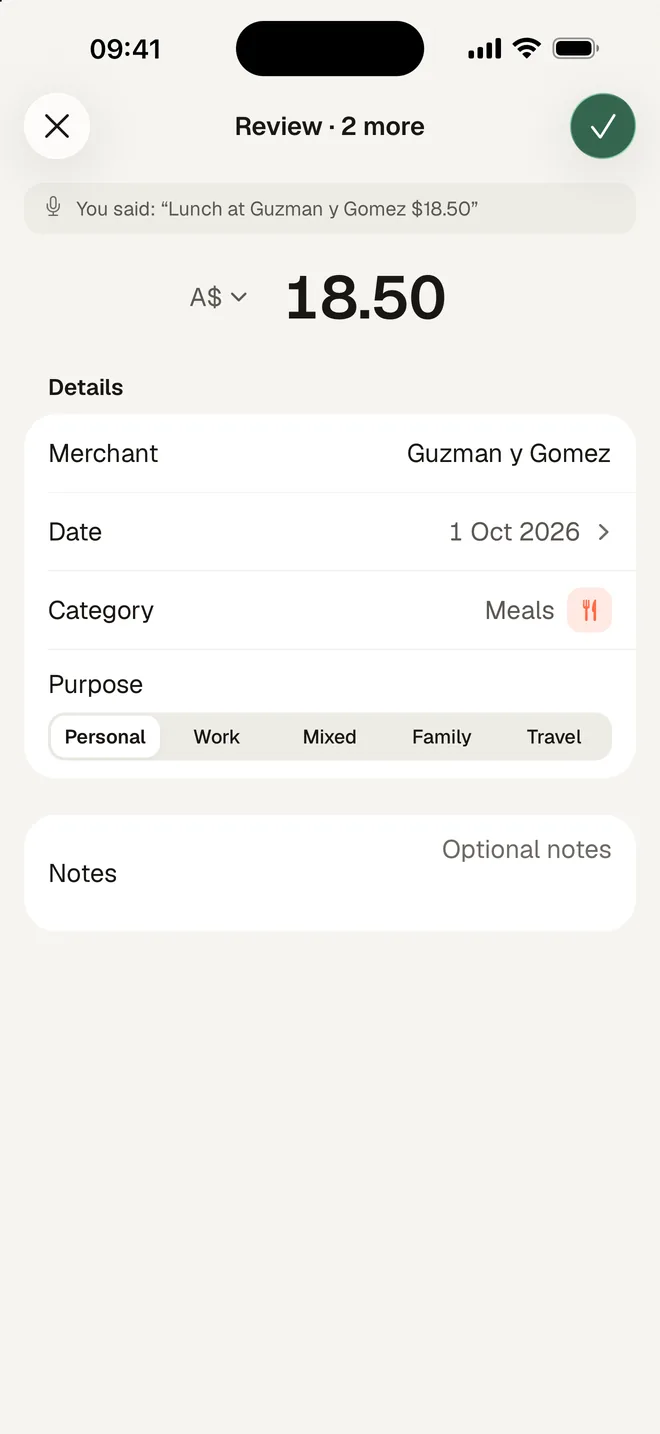
An expense app gives you more than one way in, so whichever is quickest at the moment wins. Scan the receipt at the counter. Or, on iOS 26, tap + then Say it, and say "Lunch at Guzman y Gomez, $18.50": the record is filled in for you to check.
On iOS 26.7 and later, a Shortcuts automation on Wallet can log contactless Apple Pay taps in shops the moment they happen. It is the only automatic capture iOS offers: it does not cover online or in-app purchases, and it hands over no history.
Whatever slips through, a PDF bank statement catches once a month. Import it, tick the charges that never became a record, and the gap is closed.
What a record must show
Supplier, amount, date and what it was for, every time. For anything you may need to prove, the receipt image as well, and the work-use share if it was partly for work.
Where systems usually break
The receipt drifts away from the number
The amount goes in the app, the paper goes in a drawer. Six months later you have a figure you cannot back up. Keep them attached from the start.
The busy month gets skipped
Any method that needs a quiet evening will lose the months that are not quiet, and those are the months with the most spending.
The app holds the data hostage
Before committing, check you can get everything out as a file. An expense history you cannot export is one shutdown away from gone.
Frequently asked questions
Can the iPhone track expenses without an app?
Does Apple Wallet track my spending?
How often should I review what I have recorded?
Read next
- Set up Apple Pay auto-logThe Shortcuts automation, screen by screen.
- How to organise receipts for tax timeTurning captured expenses into something you can hand over.
- iPhone expense trackerWhat HeyJerni does with the phone, if you decide you want an app.
- Expense tracker without bank linkingThe trade-off between a bank feed and capture on the phone.
Australian references
Last reviewed: September 2026. Tax information on this page is based on publicly available Australian Taxation Office guidance. HeyJerni is a record-keeping tool and does not provide tax or financial advice.

If you want the app version of this
HeyJerni does the capture, the categories and the receipt storage on the phone, free, without an account or a bank connection.
