An Apple Pay Expense Tracker That Logs the Purchase as You Tap
The expenses you lose are the ones you meant to write down later.
Needs iOS 26.7 or later for auto-log. Free on the App Store.
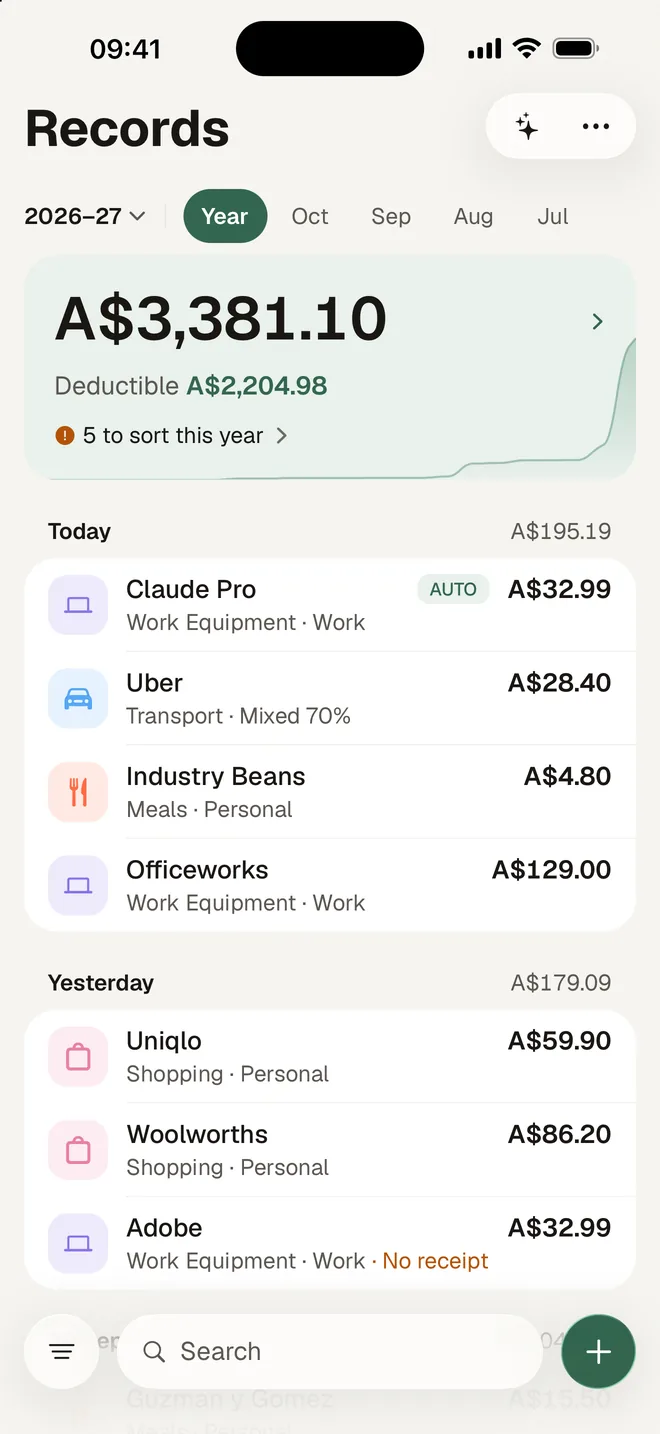
HeyJerni removes the later: set up one Shortcuts automation, and from then on every tap-to-pay purchase on the cards you choose is recorded with the merchant, the amount and the date, on the spot, without you opening the app. No bank login, no account, nothing sent to a server.
How it actually works, in plain terms
HeyJerni does not read your Apple Pay transaction history. What it uses is a Shortcuts automation, available on iOS 26.7 and later: it runs when a transaction happens on a card you select in Wallet.
You set that automation up once. It runs the HeyJerni Auto-Log shortcut and passes it two things: the merchant and the amount. HeyJerni saves an expense with those details, dates it now, and sends you a notification. The whole exchange happens on the phone.
That is the entire mechanism. There is no bank feed, no card issuer integration, and no account anywhere. It also means the automation only covers the cards you picked, and only payments iOS reports through that trigger.
Three steps, once
Setup takes a couple of minutes and you never touch it again.
Add the shortcut
HeyJerni opens Shortcuts with the ready-made Auto-Log shortcut, already wired to receive the amount and merchant. There is nothing inside it to edit.
Create the Wallet automation
In Shortcuts, add a new Transaction automation, choose the cards to watch, turn on Run Immediately, and point it at Auto-Log.
Pay once to test
Make any Apple Pay payment. Within seconds the notification arrives and the expense is sitting at the top of your records.
What gets logged and what does not
Auto-log is very good at the thing it does and blind to everything else. Knowing which is which is the difference between trusting your records and being surprised by them.
| How you paid | What happens automatically | What you still do |
|---|---|---|
| Apple Pay, on a card in the automation | Merchant, amount and date recorded on the spot | Confirm the category and work use later |
| Apple Pay, on a card you did not select | Nothing | Add the card in Shortcuts, or scan the receipt |
| Physical card, cash or bank transfer | Nothing | Scan the receipt or add the expense by hand |
| Any purchase where you need the receipt kept | The amount, not the evidence | Photograph the receipt and attach it |
Auto-log captures a merchant and an amount, not an itemised receipt. For anything you may need evidence for, scan the receipt as well.
Why it changes what your records are worth
Nothing is missed because you were busy
The purchases that never get recorded are the small ones made mid-job or mid-commute. Those are also the ones that add up to real money across a year.
Merchant memory does the sorting
Once you have told HeyJerni what a merchant usually is, later purchases from the same place arrive already categorised, so review is a tap rather than a form.
No credentials, anywhere
Automatic tracking normally means handing an app your bank login. This route asks for nothing: the trigger comes from iOS, and the record is written locally.
A complete year to check
Because the capture happens by itself, Record Check at 30 June is reviewing a full year rather than reconstructing one from memory.
Want the setup steps with screenshots?
The setup guide walks through the Shortcuts automation screen by screen, including the Run Immediately setting that most people miss and the reason payments stop logging if it is off.
Worth it if you
- Pay for most things with Apple Pay
- Keep losing small work purchases
- Are on iOS 26.7 or later
- Do not want to link a bank account
- Want the record written on your own phone
Less useful if you
- Pay mostly with a physical card or cash
- Need itemised line items rather than a total
- Want transactions pulled from every account you own
- Are on Android, where none of this exists
Frequently asked questions
Does HeyJerni read my Apple Pay transaction history?
What does the automation actually send?
Which iOS version do I need?
Why did a payment not get logged?
Does this replace scanning receipts?
Is it free?
Related pages
- Apple Pay auto-log setup guideThe Shortcuts automation, screen by screen.
- iPhone expense trackerThe rest of what the app uses the phone for.
- Expense tracker without bank linkingHow automatic tracking works when nothing is connected.
- Why auto-log matters at tax timeWhat automatic capture is worth across a financial year.

Set it up once, then stop thinking about it
Download HeyJerni, spend two minutes in Shortcuts, and let the next Apple Pay purchase record itself.
