Automatic Expense Tracking with Apple Pay: Why It Matters at Tax Time (Australia)
A missed expense is one you cannot claim. How HeyJerni's Apple Pay auto-log captures tap-to-pay purchases as they happen, what the ATO still needs from you, and a two-minute weekly routine that makes tax time boring.
Most people do not lose deductions because they misread the rules. They lose them because the expense never made it onto any list. The A$4.80 coffee with a client, the A$29 cable for the work laptop, the parking outside the site. Small, forgotten, gone.
HeyJerni’s Apple Pay auto-log exists for exactly that gap. This post covers what it does, why capturing an expense at the moment you pay beats every other method, and what the ATO still expects from you once the expense is in your records.
The July archaeology problem
The usual plan is to sort it out at tax time from the bank statement. Then July arrives and the statement reads like a puzzle: SQ *COFFEE 4.80, PAYPAL *STOREXYZ 29.00, a dozen merchant codes you cannot place, and no way to tell which were work. A statement records that money left, not what for, and by July you no longer remember either.
The expenses you do reconstruct are the big ones. The small, frequent ones, which add up to the most over a year, are the first to disappear.
What auto-log does
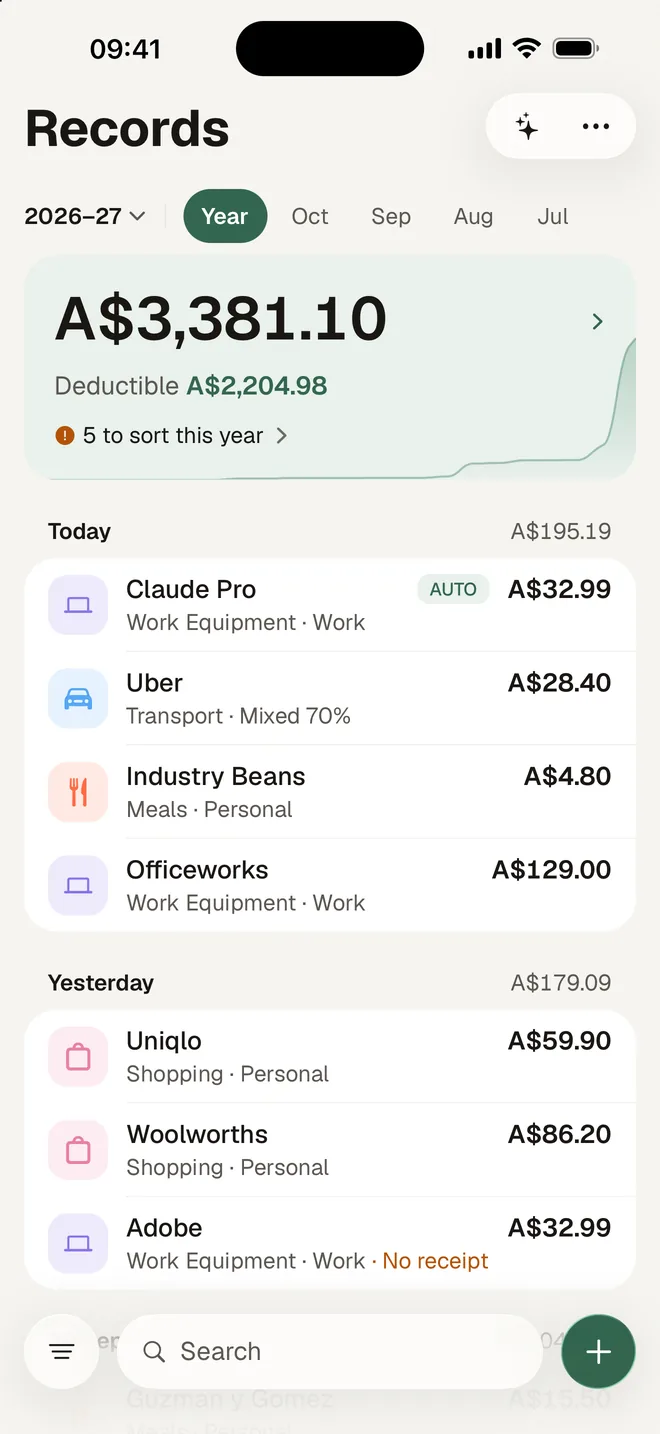
You set up one Shortcuts automation on your iPhone, once. From then on, every time you tap to pay with the cards you chose, iOS runs the HeyJerni Auto-Log shortcut, HeyJerni saves the merchant, amount and date as a record, and a notification tells you it happened. Nothing to type. Shop purchases get their category as usual, and public transport top-ups and fuel go under Transport, even the first time you pay there.
It is not bank linking. HeyJerni never logs into your bank and never sees your card number. Apple’s Shortcuts app passes the merchant name and the amount to HeyJerni on the phone, and the record stays in the encrypted database on your iPhone. No servers of ours, no account.
The setup takes about three minutes. The step-by-step guide with screenshots walks through it.
Why capturing at the moment of payment wins
- Nothing tapped goes missing. Every contactless tap is in there, including the ones you would never have remembered. You decide later which to claim; you no longer have to remember they happened. Online and in-app Apple Pay do not trigger it, because the Wallet automation only fires on a contactless tap, so those still go in by camera, by voice or by hand.
- Merchant, amount and date are data, not memory. They are searchable, filterable and exportable from day one. No re-typing in July.
- Categories stick. Set a category for a merchant once and HeyJerni applies it the next time that merchant appears.
- Purpose is decided while you still know it. Mark work, personal or mixed, and the work-use percentage, on the day. In July you will not know whether that Officeworks run was for the office or the kids.
- No bank linking. Nothing to reconnect when the bank changes its login flow, and nothing leaves the phone. Statements come in only if you choose to import a PDF.
What the ATO still needs from you
An auto-logged transaction is the start of a tax record, not the end of one. It gives you the merchant, the amount and the date, but not what you bought, so anything you claim still needs its receipt. Scan the receipt and attach it to the auto-logged record; Record Check then shows which work expenses still lack one before you lodge.
The rest of the rules, from written evidence once your claims pass $300 to the $10 small-expense allowance and keeping records for five years, are in the full guide to ATO receipt rules.
A two-minute weekly routine
Open Records, filter Unreviewed
These are the week’s auto-logged expenses.
Confirm each one
Check the category, set the purpose, and add a work-use percentage where it applies. Most take one tap, because the merchant is already known.
Attach the receipts
Scan any receipts still in your wallet and attach them to their records.
At year end, run Record Check
Fix what it flags, then export the Accountant Pack for your accountant or for myTax.
What it will not do
- Cash, a tap with the physical card and bank transfers are not captured. Scan the receipt, say it, add it by hand, or import the statement PDF.
- It needs iOS 26.7 or later; below that the Wallet transaction trigger does not reliably fire.
- Refunds are not detected. Edit or delete the record.
- It records the expense. Deciding whether it is deductible is still yours, or your accountant’s, to make.
Sources
- ATO: records you need to keep
- ATO: deductions you can claim
- ATO: occupation and industry specific guides
Last reviewed: September 2026. Tax information on this page is based on publicly available Australian Taxation Office guidance. HeyJerni is a record-keeping tool and does not provide tax or financial advice.

Have the year's records ready on your iPhone
Scan receipts, say an expense, let Apple Pay purchases log themselves and record your drives. At tax time Record Check shows what is missing, and the Accountant Pack hands it all over. Free, with no account.
