Tax Return Due 31 October: Sort a Year of Receipts in One Afternoon
If you lodge your own return in Australia it is due by 31 October. A three-hour plan to gather every receipt, decide what each one was for, find the gaps against your bank statement, and hand over one tidy file.
If you lodge your own tax return in Australia, it is due by 31 October. Most people who are late are not late because the form is hard. They are late because the receipts are in four places: a camera roll, an email inbox, a glovebox and a bank statement nobody has opened since July.
This is a plan for one afternoon. It will not make up for records you never kept, but it will get everything you do have into one place, in a shape you can type into myTax or hand to an accountant.
First, check which deadline is yours
31 October is the date for people who lodge their own return. If you use a registered tax agent, the agent usually has a later lodgment program, but you generally need to be on their books before 31 October to get it. If you have not engaged one yet and the date is close, that phone call comes before anything in this article.
If you are going to be late, lodging late is still better than not lodging. The ATO website sets out what happens and how to ask for more time.
Hour one: get everything into one pile
- Paper. Wallet, glovebox, the drawer. Photograph each one now, before the thermal paper fades any further.
- Photos. Search your camera roll for “receipt”. iPhone finds most of them by itself.
- Email. Search for “tax invoice”, “receipt” and “order confirmation” since 1 July last year. Software, subscriptions, tools and courses mostly live here.
- Bank statements. Export the PDF for the financial year from your bank app. It shows that money left, not what it bought, so it is not proof of a purchase, but it is the best list of what you forgot.
Hour two: decide what each one was for
This is the step people skip, and it is the one that decides the size of the claim. For every expense, the question is the same: was it for work, for you, or for both?
- Work. Counts in full, if you paid for it yourself and were not reimbursed.
- Mixed. A phone, internet, a laptop. Only the work share counts, and the percentage needs a reasonable basis.
- Personal. Does not count. Keeping it in the same list is still useful, because it stops you wondering about it again next week.
Once your work-related claims pass $300 in total you need written evidence for all of them; that rule, the four-week diary behind a work-use percentage and the rest are in plain English in how long to keep receipts for tax in Australia.
Hour three: find the gaps, then stop
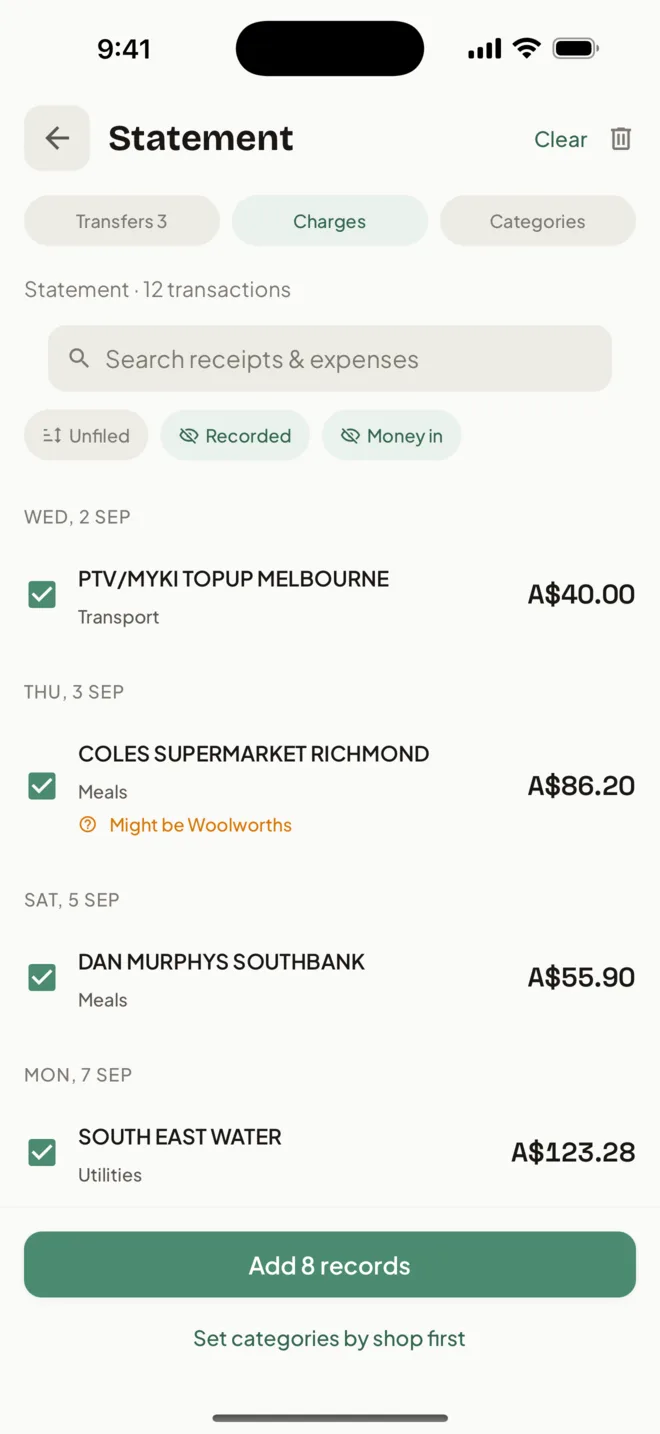
Go down the bank statement once. For each line that looks like work, check there is a record with a receipt behind it. Where there is not, look for the email, the supplier’s account page or the shop’s reprint. Some you will not find. Note them and move on: an afternoon spent hunting one $14 receipt is how the whole job stays unfinished.
Then total it by category. That is what myTax asks for and what an accountant wants first: the deductible total, a list behind it, and the receipts behind the list.
Sources
- ATO: records you need to keep
- ATO: deductions you can claim
- ATO: occupation and industry specific guides
Last reviewed: September 2026. Tax information on this page is based on publicly available Australian Taxation Office guidance. HeyJerni is a record-keeping tool and does not provide tax or financial advice.

Have the year's records ready on your iPhone
Scan receipts, say an expense, let Apple Pay purchases log themselves and record your drives. At tax time Record Check shows what is missing, and the Accountant Pack hands it all over. Free, with no account.
